


TL;DR:
- Create a comprehensive autism resource binder quickly using an emergency summary, current IEP, and appointment packet. Regularly update and organize sections by current documents, with digital backups, to aid emergencies and provider communication. The binder serves as an advocacy tool that supports effective caregiving through simple, consistent organization.
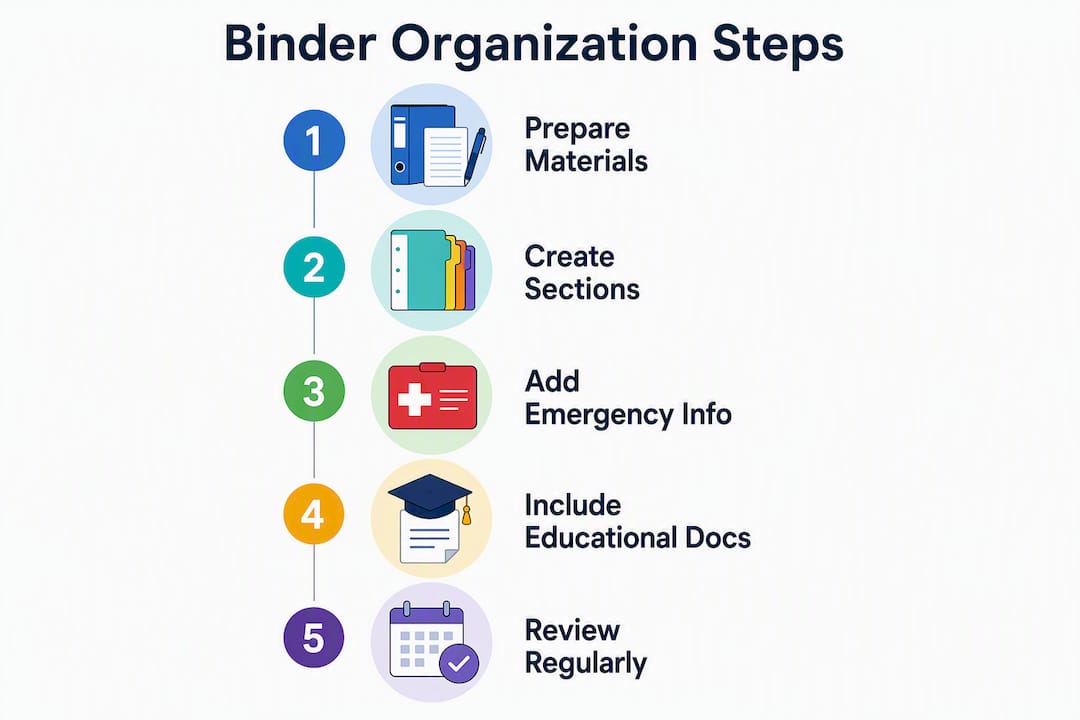
You can have a working autism resource binder ready in under an hour. Start with three things: (1) a laminated emergency summary on page one, (2) your child’s current IEP or medical summary, and (3) a compact appointment packet you can grab on the way out the door. That’s the whole system in its simplest form. Everything else builds from there.
Do these three things right now:
- Write out your child’s diagnoses, current medications with dosages, allergies, and two emergency contacts on a single sheet
- Pull the most recent IEP or 504 plan and place it directly behind that sheet
- Find a small accordion folder or pocket binder for appointments
Pro Tip: Set up your emergency contacts before you do anything else. If the binder never gets finished, that one page still protects your child.
Table of Contents
- What supplies and format should you use?
- What goes on the front-loading emergency summary?
- What should each core binder section contain?
- Which organizing method will you actually stick with?
- How do you keep the binder from becoming an archive?
- When does paper beat digital, and when does digital win?
- Where do you find ready-to-use templates?
- Who should see the binder, and what should you share?
- Key Takeaways
- The binder is an advocacy tool, not just a filing system
- Autismdoctorsearch helps you fill the gaps in your binder
- Useful sources for further reading
What supplies and format should you use?
A physical three-ring binder with medium thickness rings works well for most families. Add clear sheet protectors, tabbed dividers, and a small laminator or a trip to a local office supply store for lamination. For scanning, apps like Adobe Scan or Microsoft Lens turn your phone into a sheet-fed scanner in seconds.

The hybrid approach works best for most caregivers: a master binder at home, a pocket mini-binder for appointments, and an encrypted cloud folder for backups.
| Format | Durability | Portability | Shareability | Security |
|---|---|---|---|---|
| Physical binder | High | Low | Low | High (stays home) |
| Pocket mini-binder | Medium | High | Medium | Medium |
| Encrypted cloud | N/A | High | High | High (with 2FA) |
Pro Tip: Marcus Autism Center recommends picking the format you will actually use — a tabbed binder, accordion file, or digital app — because consistency matters more than complexity.
What goes on the front-loading emergency summary?
The emergency summary is the single most important page in the binder. Laminate it or slip it into a clear sleeve so it survives spills and stays visible the moment anyone opens the cover.
Include these fields, one line each:
- Child’s photo (top right corner), legal name, and date of birth
- Primary diagnosis(es) with year of diagnosis
- Current medications: name, dosage, prescribing provider
- Allergies (food, medication, environmental)
- Critical behavioral triggers (2–3 short phrases, e.g., “loud unexpected sounds”)
- Immediate calming strategies (2–3 short phrases, e.g., “weighted blanket, low voice”)
- Primary emergency contacts: name, relationship, phone
- Insurance carrier and policy number
Use at least 12-point font. Keep every entry to one line or a short bullet. Make a wallet-sized laminated copy of the same information for the pocket mini-binder.
Pro Tip: A medical emergency ID card that mirrors your emergency summary gives first responders instant access when the binder isn’t present.
What should each core binder section contain?
A master binder architecture places personal information at the front, medical and therapeutic records in the middle, and educational documents toward the back for quick access during evaluations. Here’s what to file in each section.
| Section | Key documents | Update frequency |
|---|---|---|
| Personal & emergency | Emergency summary, photo ID, insurance cards, birth certificate | After any change |
| Medical history | Specialist contact info, vaccine records, hospitalization notes | After each visit |
| Medications | Current med list with dosages, pharmacy info, prior med history | Immediately on change |
| Therapy records | ABA, OT, speech progress notes, goals, discharge summaries | After each report |
| Education (IEP/504/IFSP) | Current + prior years, evaluation reports, meeting notices | After each IEP cycle |
| Communication & behavior | Behavior plans, AAC device info, sensory profiles | When updated |
| Schedules & routines | Daily visual schedules, transition plans | Seasonally |
| Funding & financial | Insurance EOBs, waiver paperwork, receipts | Monthly |
| Meeting logs | Date, attendees, summary, action items | After every meeting |
| Archive | Documents older than two years | Quarterly |
For the education section, keep the current IEP on top with prior years behind it in reverse chronological order. Your meeting log template needs just four fields: date, who attended, what was decided, and next steps.
Use a consistent file naming convention for digital copies: YYYY-MM-DD_DocumentType_Provider (for example, 2025-03-15_ProgressNote_OT).
Which organizing method will you actually stick with?
Three approaches work, and the right one depends entirely on your habits.
- Reverse chronological (newest first): Every document goes in front of the previous one. Simple to maintain, and special education lawyers often prefer it because it shows a child’s development step by step.
- Provider/service sections: One tab per provider or service type. Works well when you have many specialists and want to pull everything from one doctor in one place.
- Hybrid (recommended): Current active documents organized by topic in the front, older records archived by year in the back. This is what most experienced caregivers settle on after trying the other two.
Color-coding makes a real difference when you’re flipping through the binder mid-appointment. A simple system: blue tabs for medical, green for education, orange for therapy, red for emergency. Label each tab with the section name and a short date range so you know at a glance what’s current.
Experts caution against over-categorization. A chronological flow often helps evaluators track progress more easily than rigid labels that documents don’t always fit neatly into.
How do you keep the binder from becoming an archive?
The binder fails when it becomes a pile. A short recurring routine prevents that.
- Immediately after a meeting or appointment: Add new progress reports, update the meeting log, note any action items.
- Monthly quick-scan (10 minutes): Check that the emergency summary is current, file any loose papers, add new insurance EOBs.
- Quarterly add/remove cycle: Pull documents that are no longer active and move them to a dated archive binder or cloud folder. Update the medication list if anything changed.
- Annual deep audit: Review every section, confirm contact info is current, and check that the IEP reflects the current school year.
Setting regular review reminders on your phone calendar is the simplest way to make this stick. Marcus Autism Center recommends dedicating scheduled time monthly or quarterly to add new progress reports, remove outdated forms, and update your active questions for upcoming appointments.
Keep the current year and the two prior years in the master binder. Everything older moves to archive.
When does paper beat digital, and when does digital win?
Paper wins for legal originals, in-person reviews, and emergencies where internet access isn’t guaranteed. Digital wins for searching, sharing with a new specialist across town, and redundant backup.
A practical scanning workflow: use a sheet-fed scanner or a phone app, name every file with the YYYY-MM-DD_DocumentName convention, and mirror your physical binder’s folder structure in the cloud. That way, finding a file digitally takes the same mental path as finding it in the binder.
Pro Tip: Store digital copies in an encrypted cloud service with two-factor authentication enabled. When emailing records to a provider, use a secure patient portal when one is available rather than standard email. Remove Social Security numbers from any copy you share.
Where do you find ready-to-use templates?
You don’t need to build forms from scratch. Several free templates cover the most common needs.
- Emergency summary card: One page, all critical fields, sized for lamination
- One-page child snapshot: Strengths, communication style, sensory triggers, current supports — this is what new providers need to see the whole child, not just diagnoses
- Meeting log: Date, attendees, decisions, action items
- Behavior-tracking sheet: Target behavior, frequency, antecedent, consequence
- Medication list: Name, dose, prescriber, start date, purpose
- IEP quick index: Lists each goal by domain with the page number in the full IEP
Print the emergency summary and child snapshot on heavier cardstock. Save PDF versions of every template in your cloud folder. The pocket mini-binder should carry the laminated emergency card, insurance info, and the most recent IEP or support plan so you have critical details for appointments without hauling the full binder.
Who should see the binder, and what should you share?
Not everyone needs the whole thing. Sharing the right subset protects privacy and keeps handoffs clean.
- IEP team and school staff: Current IEP, behavior plan, communication snapshot, emergency summary (without SSN or full insurance details)
- Primary therapists: Relevant therapy records, current goals, medication list, emergency summary
- Emergency responders: Laminated emergency card or the front-page summary only
- Respite caregivers and family members: Emergency summary, daily schedule, calming strategies, emergency contacts
When sharing digitally, use limited-view links in cloud storage rather than emailing full documents. Remove SSNs from any copy that leaves your hands. Keep original legal documents — birth certificate, insurance policy, signed IEPs — secured at home and share only copies.
Record keeping for autism is an ongoing process, not a one-time setup. Brief any new caregiver, teacher, or family member on where the emergency summary lives and what the color-coded tabs mean. A five-minute walkthrough is enough.
Key Takeaways
A well-organized autism resource binder built around a laminated emergency summary, a current IEP, and a consistent maintenance routine gives every provider an accurate picture of your child from the first minute of any appointment.
| Point | Details |
|---|---|
| Start with the emergency summary | Laminate a single page with diagnoses, meds, allergies, triggers, and emergency contacts before anything else. |
| Use a hybrid format | A master binder at home plus a pocket mini-binder for appointments covers both depth and portability. |
| File by section, archive by year | Keep the current year and two prior years active; move older records to a dated archive folder quarterly. |
| Scan with consistent naming | Use YYYY-MM-DD_DocumentType_Provider for every digital file so records are searchable and shareable instantly. |
| Autismdoctorsearch directory | Use Autismdoctorsearch to locate local ABA, OT, and speech providers and confirm contact details for your binder’s therapy section. |
The binder is an advocacy tool, not just a filing system
The framing that sticks with me most comes from Indiana University’s guidance, which describes the binder as an advocacy tool. That’s the right way to think about it. When you walk into an IEP meeting or a new specialist’s office with a one-page strengths snapshot alongside the medical history, you’re shaping how that provider sees your child from the start. You’re not just answering their questions. You’re setting the frame.
Most parents I’ve seen struggle with this don’t have an organization problem. They have a starting problem. The emergency summary page takes twenty minutes. That’s the whole barrier. Build that one page today, and the rest of the binder can grow around it over weeks and months as documents come in.
Marcus Autism Center’s advice to pick the format you’ll actually use isn’t a throwaway line. A beautiful color-coded system you abandon after two months helps no one. A plain accordion folder you actually update every month is worth ten times more. Adapt the sections to your child’s current developmental stage. A toddler’s binder looks nothing like a teenager’s, and that’s exactly right.
Autismdoctorsearch helps you fill the gaps in your binder
One of the hardest parts of building a complete binder is tracking down provider contact details, especially when your child has recently changed therapists or moved to a new school district. Autismdoctorsearch is a free directory of autism-specific resources across the U.S., covering ABA therapy, occupational therapy, speech services, medical clinics, and special education schools. When a section of your binder is missing a provider’s name, address, or phone number, the directory is the fastest place to find it.
Search for local therapy providers to fill in your therapy section, or browse listings to confirm contact details before your next appointment. The directory complements your binder rather than replacing your personal notes — think of it as the source you check when a contact goes stale or a new specialist enters the picture.
Useful sources for further reading
The following U.S.-focused resources support the guidance in this article. Consult your child’s providers for document-specific questions.
- Organizing Your Child’s Records — Parent Information Center (PIC NH): IEP Organizer Format and section-by-section filing guidance; supports the core sections and education section recommendations.
- A Guide to Organizing Your Paperwork — Pathfinders for Autism: Chronological filing strategy and document management tips; supports the organizing methods section.
- Organizing Your Child’s Health Information — Marcus Autism Center: Format selection and maintenance cadence guidance; supports the maintenance routine and hybrid format recommendations.
- How to Build a Personal Autism Resource Binder — Dan Marino Foundation: Emergency summary card and pocket mini-binder instructions; supports the front-page summary and portability sections.
- Creating a Binder — Indiana University Pressbooks: Frames the binder as an advocacy tool for self-advocacy and transition planning.
- How to Organize Autism Records for Evaluations — Guiding Growth: One-page child snapshot recommendation; supports the templates section.


